I’ve tried a lot of productivity apps in my life. I started with a little notepad called Tuexduex. It’s a dead simple app, basically giving you nothing to play with, so you could focus on just work. It was great for what I needed at the time, but I always found myself needing more functionality from my task manager apps. So after roughly a year, I moved on to Ticktick. TickTick gave me everything a budding task management guy could ever want. Habits, time blocking, Pomodoro timers, priorities you name it, it had it. But that was the exact problem, It had too much. I found myself spending more time on how my task manager was set up than getting things done, Plus, the design for the app was garbage. It looked like a software engineer added a bunch of bloat and worried about design after the fact. So, after yet another year of tick tick, I bought a one-month subscription to Todoist, while not the most shiny and best-designed app, felt the most complete. The apps worked quickly and all the behaviors are what you’d expect them to do. The features were a little slimmer than Ticktick, and that’s a great thing. I also loved the sheer number of third-party integrations with other apps. Having my tasks sync to Fantastical (my calendar app of choice) and being able to see them while I plan my day is phenomenal. After trying it out for a month, I was enjoying Todoist, far better than Ticktick and leaps and bounds better than Tuexdeux. But then I found Things 3, and my task management brain exploded.
Pricing
Alright, let’s get this part out of the way now, as it’s different from all the other options available.
Things 3 costs:
USD 10 for the iPhone/Watch app
USD 20 for the iPad app
USD 50 for the Mac app.
SideNote, these are the prices as of this review’s publishing, in the “great” land of the USA, If you live somewhere else, the prices might be different in your region.
This means that to get it on all platforms, you’re going to be paying $80 to use it everywhere. While some might think this is high and trust me, it is, every other app I’ve listed thus far requires a paid subscription to keep using it. Which brings me to my next point
I. Hate. Subscriptions.
With every fiber of my being, I hate paying for subscriptions unless they provide enough updates and year-over-year value that warrants the cost. Some apps handle this incredibly well. Apps such as Carrot Weather, Ulysses, Fantastical, and Apollo for Reddit are just some of the ones I use (I also used Tweetbot before it got Eloned, Rip Tweetbot) All these apps add enough features and are still in mostly active development, and I’m happy to support developers for good apps. But then some apps get too comfy with the model. I hate to do it to them, but I got to call out Bear here. Yes, it is a stellar writing app, but I was paying 14 bucks a year for essentially an app that was just being maintained, not improved. I used Bear for over 5 years before switching to Ulysses, because it’s honestly a well-designed app, but I can’t in good conscience keep paying for something that is never changing.
Alright, but how does this relate to Things 3? Well, Things 3 isn’t a subscription-modeled application, which is crucial. You pay for all the applications upfront. This has both pros and cons. The pros of this are your one and done. If you use Things 3 for more than a couple of years, the initial purchase price pays for itself, rather than paying Todoist $30 a year. A con of this approach is, you have to pay for the newest versions of the app. So when things 4 comes out (hopefully, maybe never) you’ll be forced to pay the initial cost again. This is one of the main reasons why I use Things. I’m not being forced to pay monthly or annually for something that may or may not be updated.
Design
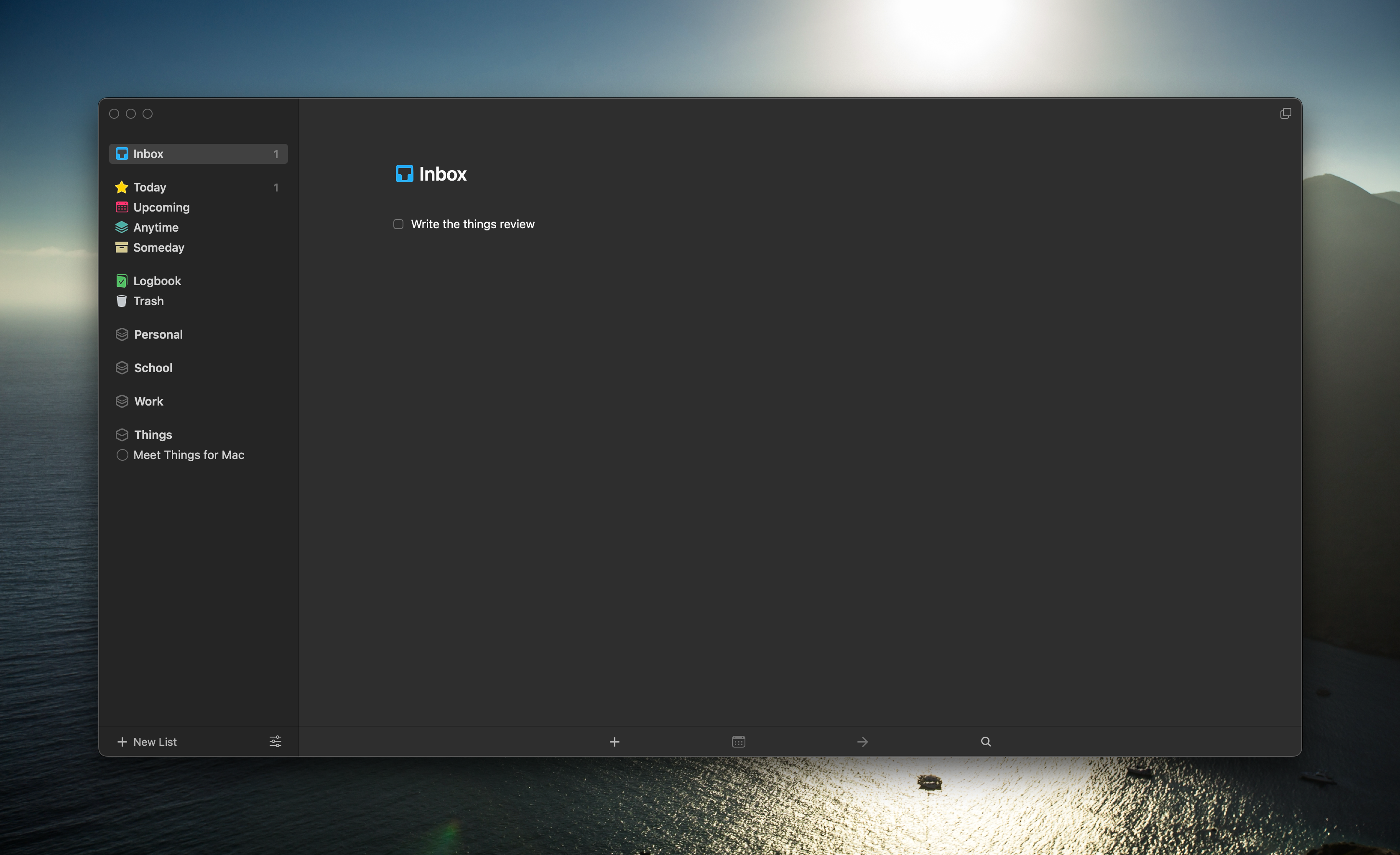
Just look at this. Look at the screenshots on their website. This app is beautifully designed. It looks as if Apple made their reminders app not look like complete and utter crap. (Update: Apple has made this better , but still not close to the level of Things) The icons blend into the background and sidebars in an extremely satisfying and elegant way, and the in-house custom-designed animations for just the most mundane tasks make this app feel lively and fresh. Plus, with the app running natively, (no electron here!) Everything feels fluid and smooth.
Functionality
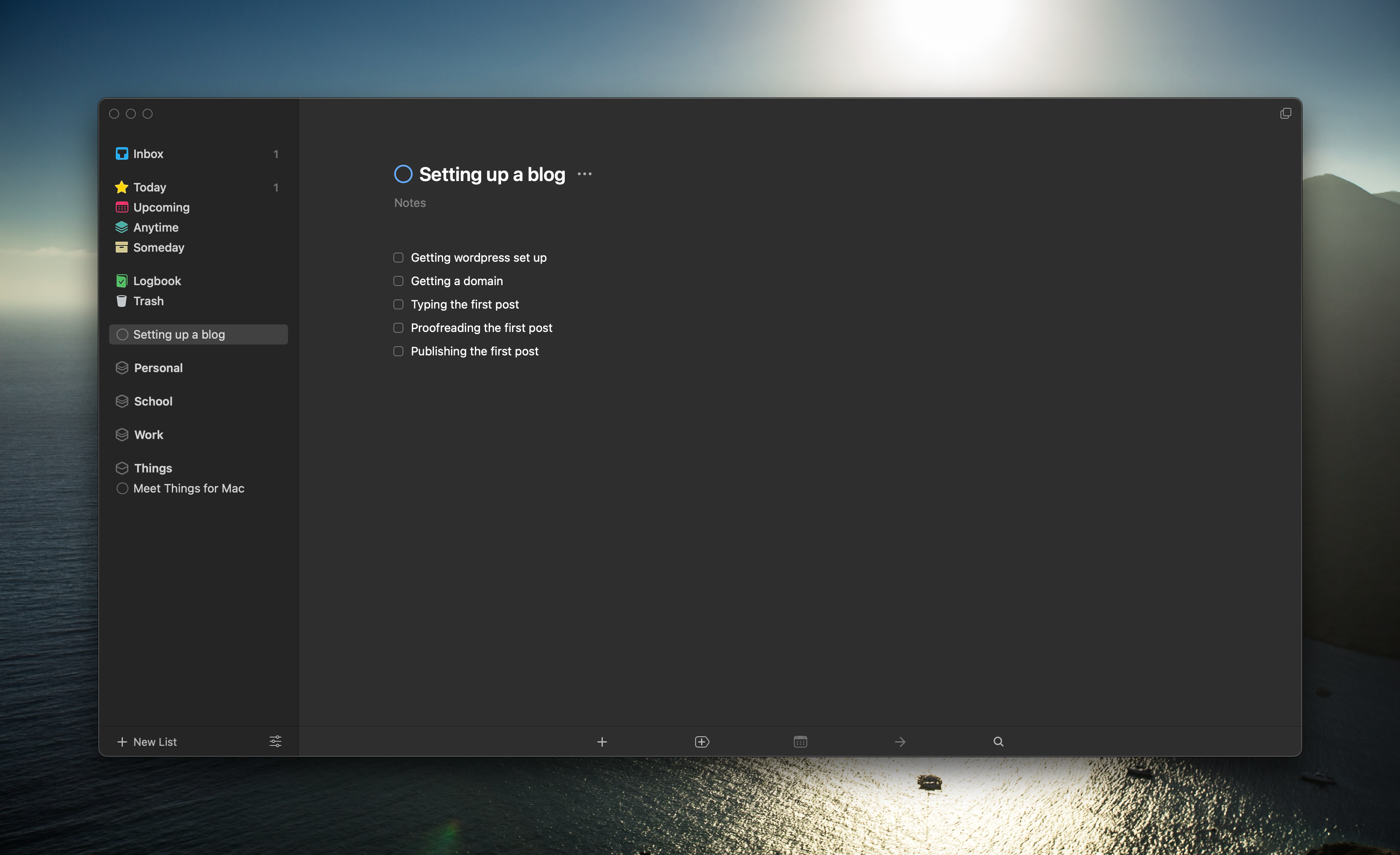
Things 3 has all the essentials you’d come to expect from a modern task management app. In Things, your app is broken down into the views on top and the “Areas” and “Projects” on the bottom. Areas are for the areas you want to focus on. In mine, that’s personal, school, and work. Inside these areas, you have projects. Projects are a set of to-dos that specifically correlate with a current thing you’re doing. For example, let’s say you’re starting up a new blog to write stuff on. The area would be personal or work, and the project would be “Setting up a blog.” Inside would be the to-dos related to setting up the blog such as “Setting Up WordPress” or “Finding a domain” As you complete the project, a little project pie fills up. This is great to visually record how far you are along in your tasks and how close you are to completion. Once you’ve completed everything in your project, you can mark it as completed, and it just disappears. It’s a really great system, and it helps me only focus on the actionable items, not the non-actionable items.
Another great feature I use almost every day is quick entry and quick entry with autofill. These two features are single-handedly responsible for increasing my productivity 10-fold. Pressing control + space pulls up the following window anywhere in the OS.
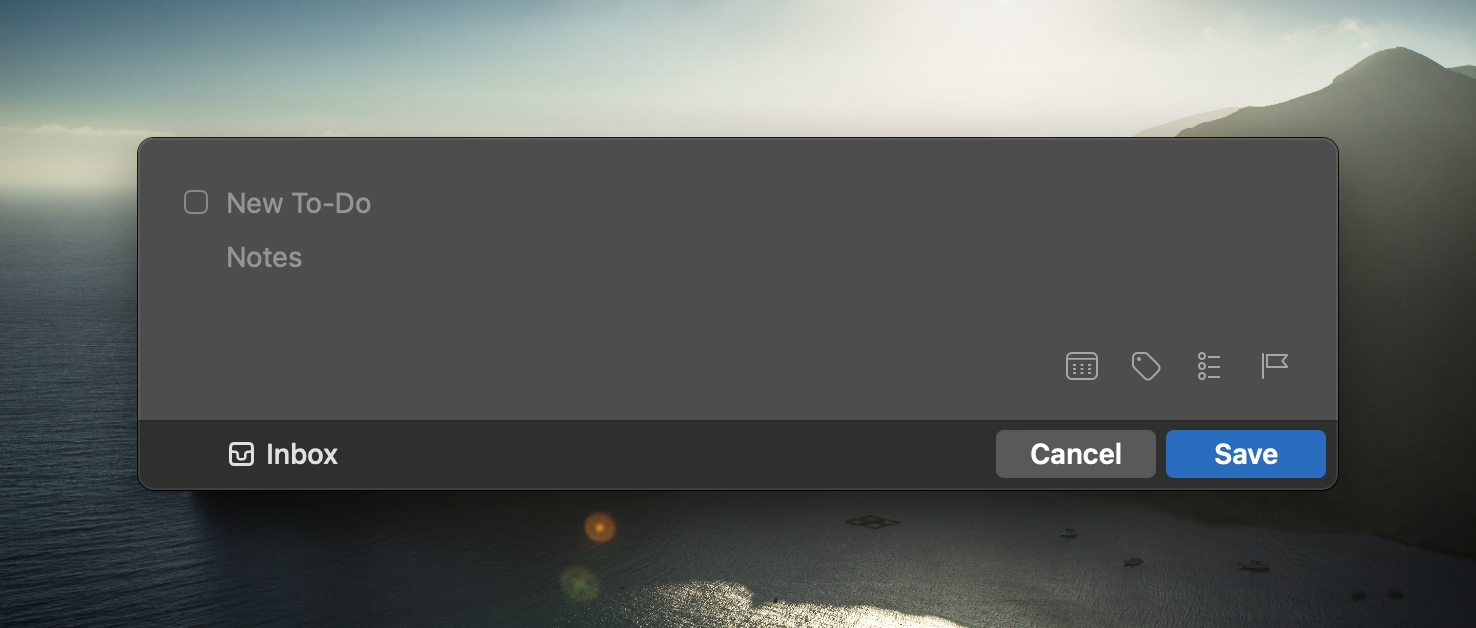
This allows you to quickly jot down a new task and get it out of your brain quickly. I’ve also found while studying, that quick entry helps me stay more focused because I can just stash that random idea away for later whenever I need to and get instantly back to what I was doing before. Furthering this, if you invoke quick entry with autofill, it will intelligently pull in the name and link of whatever you’re viewing to create a new task.
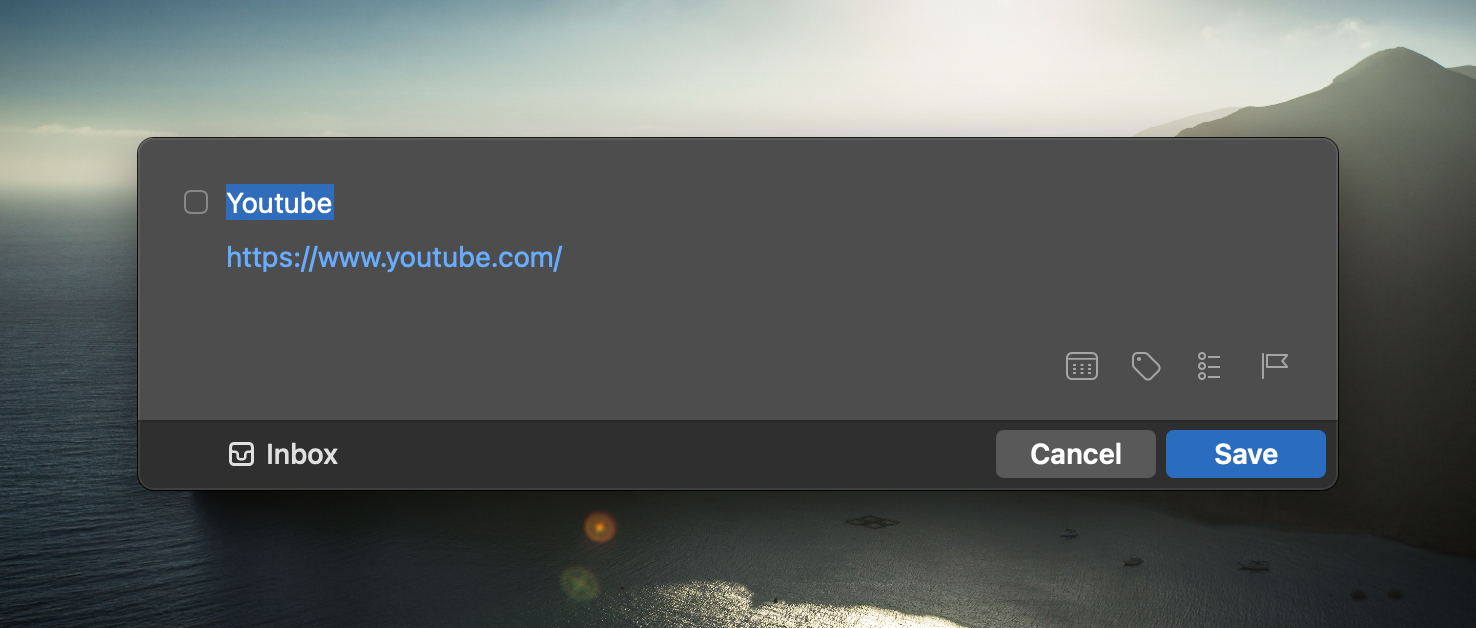
It’s awesome for when I do my Monday Canvas Import and I need to get all the tasks into things quickly. (Canvas is a LRM that my university uses)
And that’s just the tip of the iceberg of what this app can do. It also has incredible keyboard shortcut support. Almost everything can be done without touching the mouse once. Deadlines and due dates are another great one. When I’m in school, I like to monitor when the assignment is due, and when I’m actually going to do the assignment. Things let me set each of these individually, so I can keep track.
Day-to-day use
The app follows the Getting Things Done methodology by David Allen. (Awesome book, strongly recommend it, it’s on Amazon, read it) After capturing your new to-dos by either going into the app or using quick entry or other methods, all of your to-dos go to the inbox. Here, you’ll sort them by adding do dates, and metadata, and sorting them into a project or area. This step is called processing. After you have stuff processed, you’re done. Day to day, your to-dos will populate the Today view. This is where you’ll spend the most amount of time. Simply open up and complete all the items on today’s list. If you can’t get to them, move them to a different project or area.
What I wish was added
I am a simple guy, and Things fits 95% of my needs. However, some aspects could be improved. The big one is you can’t complete a recurring task early This drives me insane, and I have no idea why it’s still not fixed despite cultured code (the developers of Things 3) saying they’d fix it. Another thing I would like to be included is an API. I really did enjoy seeing my tasks in Fantastical and would like to have the functionality back. Some people complain about collaboration features, and while I understand where they’re coming from, the app feels designed to be single-use, and adding that would take a lot of time and effort to do right.
Conclusion
All in all, Things 3 is an extremely well-designed app. Its design is one of the best I’ve ever seen in any application. The functionality is also there for 95% of users. While there are some minor things here in there that hurt the experience, it is a fantastic app. I would 100% recommend you give it a shot and see if it’s for you.